Genetic Merit & Pedigree Tools for Dairy Goats
If you breed registered dairy goats, you already have some of the most useful information in the barn — and most of it never gets used. ADGA gives you linear appraisal scores, genetic evaluations, transmitting abilities, and full pedigrees. But on the genetics page it's a screen of numbers that doesn't explain itself: which scores are strong, which traits matter for your goals, and what you're actually supposed to do with any of it. And even once you've puzzled out one animal, you still can't sort your whole herd by those numbers, line two bucks up side by side, or build a mating around them. The information you worked for stays locked — behind the jargon and behind a scroll bar.
The Genetics & Pedigree Suite changes that. Bring your animals' ADGA data into Herd Manager once, and it powers a connected set of breeding tools — ranking, mate selection, progress tracking, inbreeding checks, and sale listings buyers can actually verify. It's new, it's in beta, and it's free on every Herd Manager account. No upgrade, no add-on, no genetics tier.
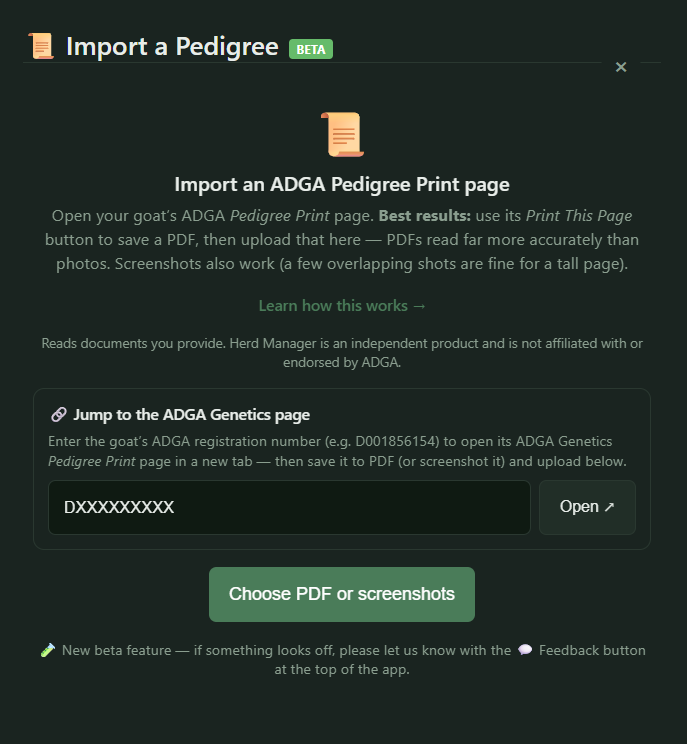
How to Import an ADGA Pedigree Page
Here's the whole flow — about a minute per goat:
- Open the importer. Go to the Herd tab, tap + Add Goat, and choose Pedigree Import.
- Jump to the page. Use the built-in quicklink — type the goat's ADGA registration number (e.g. D001856154) and it opens that animal's ADGA Genetics pedigree page in a new tab.
- Capture it. Save the page to a PDF (its own Print This Page button works best) or take a screenshot.
- Upload it. Herd Manager reads the page and fills in the record — no retyping.
PDFs read the most accurately, but screenshots work fine too — a couple of overlapping shots are fine for a tall page. It takes about thirty seconds per goat. And because no tool reads a page perfectly every time, every imported field is editable in place: if a number comes in wrong, you fix it in a tap.
What the Pedigree Import Captures
When you import a pedigree page, Herd Manager captures four kinds of data:
| Data | What It Includes | What It Powers |
|---|---|---|
| Genetic evaluation | Production indices like PTI and ETA, plus milk, fat, and protein predicted transmitting abilities, and inbreeding percentage. | Herd ranking, mate selection, trend tracking |
| Linear / type evaluation | Transmitting abilities for individual structural traits, each with its reliability. | Trait-by-trait mate complementarity |
| Linear appraisal | The final score and classification. | Sale listings, herd overview, scorecards |
| Pedigree | The full ancestry from the print page. | Family tree, inbreeding (COI), relatedness |
That's the raw material. Here's what it does once it's in.
Breeding Tools Your Pedigree Data Unlocks
- See the whole picture on each goat. The Genetics tab shows an animal's complete evaluation — genetic indices, trait transmitting abilities, appraisal, and pedigree — in one place. And every registration number across the app links straight back to its ADGA Genetics page, so you (or a buyer) are one tap from the source.
- Rank your herd. The Genetics Dashboard sorts your animals by genetic merit, so you can see at a glance which does and bucks are carrying your program — not by gut feel, but by the numbers.
- Find the right mating. Pick a doe and Herd Manager ranks your bucks — or any buck you're weighing — by how well they complement her toward a breeding goal, and tells you why each pairing scores the way it does, down to predicted production and the traits each animal shores up in the other. When you find a match you like, save it straight to your breeding plan.
- Track whether you're improving. Herd Genetic Trends shows whether your selection is moving the needle over time. Genetic-vs-Actual checks those predictions against what your does actually produced — drawing on the milk test records you already keep — so you learn how much to trust the numbers in your own barn.
- Breed responsibly. Built-in inbreeding (COI) calculations and a relatedness overlay on the family tree help you keep matings sound — especially valuable for line breeding or working with a small or rare population.
- Sell with proof. Marketplace listings show a genetic scorecard and appraisal badges, and every registration number links back to ADGA. Buyers don't have to take your word for it — they can cross-check it against ADGA's records themselves.
The Genetics & Pedigree Suite Is Free, and in Beta
The whole suite is available on every Herd Manager account at no cost. There's no genetics tier and nothing gated behind a paywall.
It's also genuinely new, so we've labeled it beta. If something reads wrong, looks off, or you wish a tool went further, tell us — the feedback button is at the top of the app, and it's how this gets better.
Start With Your Best Doe
You don't have to import your whole herd to feel the difference. Pick your best doe, pull in her ADGA page, and open the mate-matcher. Seeing your own animals ranked and explained — instead of a page of numbers you have to decode on your own — is the fastest way to understand what this unlocks.
Herd Manager is an independent product and is not affiliated with, endorsed by, or sponsored by the American Dairy Goat Association (ADGA) or any breed registry. Registry names are used only to describe compatibility with documents and data you provide; "ADGA" is a trademark of its respective owner.
Frequently Asked Questions
Is ADGA genetic data free to access?
Yes — your animals’ ADGA genetic evaluations, linear appraisal, and pedigree pages are available to you as the owner. The value comes from putting that data to work: ranking, mate selection, and inbreeding checks.
What is a transmitting ability (PTA/ETA)?
A transmitting ability estimates how much of a trait an animal is expected to pass to its offspring, based on its own records and its relatives’. It helps you predict what a mating will produce rather than judging an animal on its own performance alone.
Put your ADGA data to work
Herd Manager's Genetics & Pedigree Suite reads your goats' ADGA pedigree pages — genetic evaluations, linear appraisal, transmitting abilities, and pedigree — then ranks your herd by merit, finds complementary matings with the reasoning shown, checks inbreeding, and powers sale listings buyers can cross-check against ADGA's public records. Free on every account.
Try Herd Manager Free →